What is the Learning Unit about?
We are excited to spotlight our latest learning unit, “Clinical Reasoning with Clinical Decision Support Systems”. Clinical decision support systems (CDSS) are a broad category of digital health tools that provide knowledge and information to help users make better, individualised health care decisions. As a cornerstone of medical informatics, they have a long history of both successes and setbacks in clinical application. With the recent AI revolution, these tools have finally secured a more stable place in the toolkit of health professionals, supporting and augmenting clinical reasoning.
The learning unit focuses on helping students identify situations in which CDSS are most valuable, while critically analyzing their associated advantages and risks. It begins with a short theoretical introduction referring to Jerome A. Osheroff’s classical Five Rights framework, highlighting the key features of this class of systems. We guide learners through major clinical applications such as alerts and reminders, order sets, and computerised clinical guidelines. The unit focuses in particular on the subclass of differential diagnosis generators and symptom checkers, because these tools are closely related to the clinical reasoning processes involved in diagnosing patient problems. The unit also examines the future potential of these tools and how patient-facing DSS (Decision Support Systems) can foster greater patient involvement in the diagnostic process.
In the practical part, students explore the influence of a professional, clinician-facing differential diagnosis generator (Isabel Diagnostic Companion) at different stages of two virtual patient (VP) cases, early and late in the diagnostic process. They then discuss how the timing of tool use affects clinical reasoning.
In the second phase of the unit, students shift perspective from clinician to patient. Increasingly, patients use symptom checkers before consulting a physician. For this exercise, students are asked to use a patient-facing symptoms checker (either Ada or Symptomate), and role-play how the previously presented VPs might enter their symptoms into the system and what conclusions those tools will present to their users. This activity stimulates discussion about how such tools may influence the patient-physician relationship and how their use can be shaped to support mutual trust and shared-decision making in clinical reasoning. By combining asynchronous preparation with synchronous sessions, we ensure that students learn not only about these tools but also how to apply them to improve clinical outcomes.
How We Developed It!
This learning unit is the only one in the D-CREDO curriculum that had a precursor in the DID-ACT curriculum. We used it as a starting point for development. However, because the earlier learning unit was created at a time when IBM Watson Health represented the peak of expectations for clinical decision support, we needed to restructure it substantially to reflect a decade of developments. We ensure that students have the necessary context to approach CDSS with a critical and informed mindset by requiring prerequisites such as “Foundations of Digital Health Technologies” and “Errors & Biases.”
The two VPs used in the learning unit were extended by adding prompts within the case narration that encourage students to use a clinician-facing differential diagnosis generator. This allows them to experience, at deliberately selected moments in the case resolution, the consequences of using decision support systems. A similar experiment was carried out in research by Matt Sibbald and colleagues, and our aim was to recreate the impressions reported by clinicians in that study with the students in the learning unit.
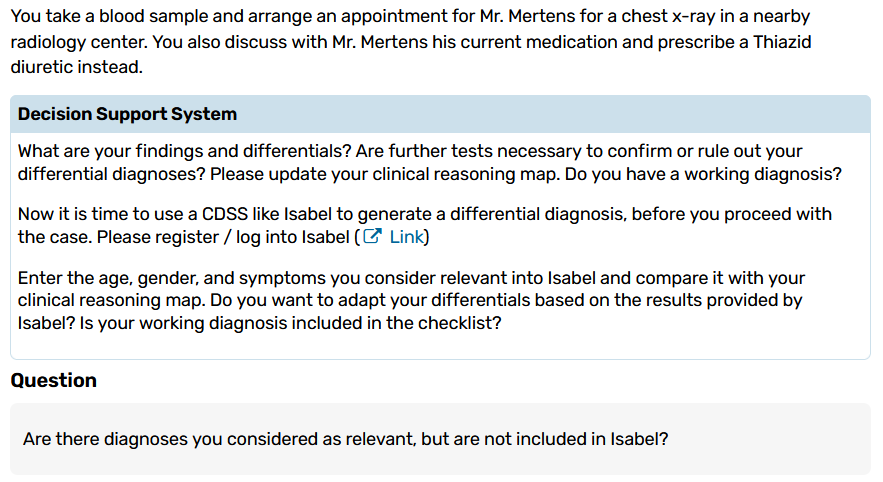
Focusing on the “when” and “why” of CDSS, we aimed to obtain more than a simple mechanical “how-to” guide. The unit is structured to compare and contrast the tools used by healthcare professionals with the symptom checkers used by patients. This helps students understand the different roles these tools play in the diagnostic process and the importance of patient involvement. Having students apply CDSS while working with VPs from the iCoViP collection as a final assignment gives them the freedom to explore the impact of CDSS across different cases, allowing them to deepen their interest in clinical reasoning and clinical decision support in a self-directed fashion.
What did we learn?
During the development of the learning unit, we learned once again how important it is to contrast different types of digital tools. By comparing differential diagnosis generating tools designed for healthcare professionals and used in different stages of CR with symptom checkers designed for patients, we were able to move beyond purely technical instruction. The activities planned in the LU enabled us to explore the future potential of patient involvement in the diagnostic process and to demonstrate how these tools can transform the relationship between clinicians and patients. The role-play exercise helps students better understand the knowledge and expectations that patients bring to consultations, and how clinicians can respond appropriately and use this information for the patient’s benefit.
A challenge for us was the changing availability of digital health tools in app stores depending on the country, even within the EU, due to differences in supported national languages. As a result, we recommend more than one symptom checker for the patient-facing CDSS component of the learning unit rather than relying on a single tool.
This learning unit also reminded us that, especially when dealing with technology-based tools in clinical reasoning, learning units need to be revisited and refined regularly to remain uptodate and useful for students. Rather than starting from scratch, we transformed existing content and integrated prerequisites from the DID-ACT and D-CREDO curricula. This approach ensures that students have a solid foundation on which to build new knowledge and develop a firm grasp of the content.
Stay connected with D-CREDO and follow our journey on LinkedIn for more updates, insights, and stories.